Posts

Showing posts with the label iNaturalist

Botany lab two iNaturalist

Image
Botany laboratory two was redesigned from a year prior. One of the focuses of the botany class is on the use of apps. iNaturalist is an app that is used to make observations of living organisms including plants. iNaturalist includes a system that can assist in potentially identifying a plant. Data gathered by iNaturalist users is often used in biodiversity and range studies.  The laboratory started with an introduction to iNaturalist. 14 of the 22 students had already been introduced to iNaturalist, thus the first part of this laboratory was review for over half of the class. Only eight students were  new to iNaturalist. After a presentation on how to use iNaturalist to make an observation, the class will split up into four groups to go out and make an observation.  Group one: Plants cross the entrance road from the new health building from the main road back to the soccer field. Group two: Plants along the main road from Jed's to the Daniel ("Green") ...

Tech Thursday and iNaturalist in ethnobotany

Image
Day two in ethnobotany was tech Thursday with an introduction to the course as set up in Instructure Canvas and an introduction to iNaturalist. The class began with a tour of the course in Canvas including the home page, Modules, Syllabus, Pages with textbook and the in-Canvas flora. Then I introduced the iNaturalist platform.  The class then worked on downloading and logging into iNaturalist - the WiFi in A101 not being well supportive of a whole class downloading an app. After everyone had downloaded the app and logged in, I took the class out to the weed patch west of the library to make a practice observation. Medleen Out in the weed patch Medleen Students picked different targets, thus avoiding the "25 pictures of the exact same plant" issue. Gorinna captures an image of Hyptis Waiting for uploads to complete and synch Also waiting for synch to complete

iNaturalist ten thousand identifications

Image
 Crossed over 10,000 identifications on iNaturalist since joining on April 04, 2019. 

Ethnobotany and iNaturalist start up spring 2020

Image
This term featured an expanded up front early exposure to digital resources in the course and iNaturalist. Day one still landed during and drop. I handed out the syllabus , the final examination , and a sheet listing some of the useful apps related to the course. The weather was good, so I took the class out for a short introduction to the plants on the east end of the campus. I later generated an iNaturalist bounding box for the area of the walk which includes some of the plants seen. I noted as I worked on the bounding box the absence of the larger trees in the box on iNaturalist. The trees are more challenging to capture in diagnostic photos. Fall 2019 I attempted to introduce iNaturalist by having the students first engage in identifications and then engage in observations. Two separate issues arose. One was that a profile with no observations may be ruled a spam account by the spam detection engines in iNaturalist. Two was that the students seemed to have difficulty g...

Assessment of student reactions to iNaturalist use in ethnobotany class

Image
Twenty-one of the twenty-three students in SC/SS 115 Ethnobotany responded to the following prompts on a term end assessment survey: Does the use of iNaturalist belong in the ethnobotany course? Why or why not? If you used iNaturalist, what did you learn from your use of iNaturalist?  Should use of iNaturalist be expanded in future?  Some students do not have smartphones. What should I do with these students when the class is working with iNaturalist? Two students were absent on the day of the survey. Of 21 students, 20 students responded that iNaturalist belongs in the ethnobotany course. The one student who responded "no" would later respond "yes" to the question of whether iNaturalist usage should be expanded in future terms.  When asked why iNaturalist belongs in the course, nine of the twenty-one students responded that the application helped them identify plants. Four students felt that an app about plants belonged in a course about plan...

Observations with iNaturalist in ethnobotany

Image
In an earlier class I had attempted to introduce iNaturalist via having the students make identifications of common and easily identified plants (think coconut palm, the only species in Cocos). As not all of my students have smartphones (nor digital cameras for that matter), I felt that starting in a computer laboratory doing identifications would let all of the students participate. As I set up the class I learned that accounts with zero observations were more likely to be flagged as spam accounts by the anti-spam system in use. I now consider that the students have to start with observations and hope to rearrange for that in the spring term. The goal for today was to have those students who had smartphones go out and make an observation or two and then return to the laboratory to annotate the observation and add observation fields. This agenda would prove overly ambitious. As some students did not have smartphones, they were instructed to simply tag along with students who have sm...

iNaturalist introduction in ethnobotany class

Image
One of the challenges within iNaturalist for student use of the platform is that students have a reputation for posting what are deemed by some iNaturalists as low quality observations . These observations often get posted in large numbers as students strive to meet some quota  artificially set by a well-intentioned teacher. The observations also often get posted either as "unknown organisms" or, when identified, identified incorrectly. Many cultivated plants get posted incorrectly as wild plants due to the platform providing a green tag that says "Research Grade" only on wild plants. Some teachers mistakenly require students to obtain a specified number of RG observations . This may result in students teaming up to validate each others incorrect identifications in order to obtain the RG designation. The students then often " vanish " from the platform after the "assignment" by the teacher, leaving for identifiers on iNaturalist the task of cle...

Technology training for faculty at the Chuuk campus

Image
Monday morning opened with my presenting an overview of what I term the three levels of Schoology . My intent is a broad overview of some of the many capabilities of Schoology. I am also reflecting my own experience with Schoology, my own path through the package. I began using Schoology essentially as a replacement for a spreadsheet based gradebook. My initial interest was only in tracking grades and attendance. I spent a term working at that level. The following term I started to pilot, to experiment, with making assignments from within Schoology. Over the next few terms I would integrate online tests and other materials into my courses in Schoology. I would also adopt the use of custom rubrics to mark assignments. After a couple years of use I added the tracking of student learning outcomes, what I term a level three use of Schoology. In the afternoon I sat down with individual faculty, one-on-one, helping them set up their gradebook setup and showing them how to add grade ...

Ethnobotanical Use observation field in iNaturalist

Image
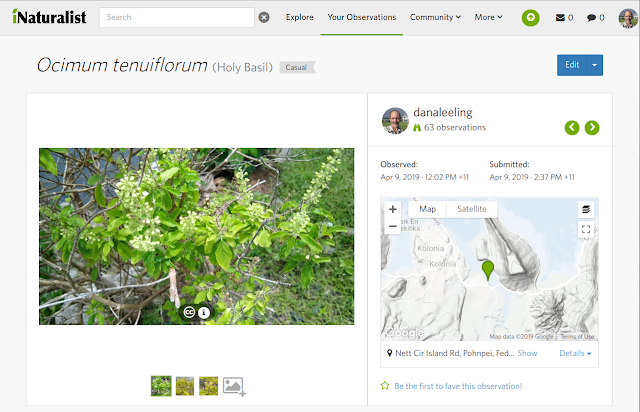
iNaturalist has a mission of connecting people to wild nature in a social spirit of citizen science. The platform produces data of use to researchers in a variety of fields, but the primary intent is to encourage people to get outside and experience wild nature. Ocimum tenuiflorum in iNaturalist While the core functionality of the platform centers on making and identifying organisms, the observations support additional fields including Ethnobotanical Use, Common Name in Local Language, and Local language used for common name. These optional fields provide support for including ethnobotanical information in an observation. Observation fields on Ocimum tenuiflorum observation Observation fields can only be created and edited from the web interface, not from the smartphone apps. My own workflow is to upload images taken with my smartphone via the app and then edit the images on the desktop interface later, adding plant phenology notations, establishmentMeans, and, ...