Posts

Showing posts with the label education+tech

What is 120 plus 12?

Image
"What is 120 plus 12?" I asked the student. The student and I were measuring the circumference of a hoop that exceeded the length of the 120 inch tape measure. The student had chosen to measure the circumference and to use inches. The tape measure was 12 inches short of the circumference, the student was holding the tape measure showing that the gap remaining was 12 inches. The student looked up from the measurement in hand and said nothing. I waited.  Students in a prior term timing the period of a hoop. The period of a hoop is linearly related to the diameter. "Just add the 12 to the 120, what is 12 more than 120?" The student looked at me blankly. I waited. After twenty seconds, the student asked, "I can use my cell phone calculator?" The student pulled out their cell phone and obtained 132.  "You couldn't do that calculation in your head?" I asked. The student indicated that they could not.  ❖ "Plummeting math scores prompted lawmake...

Will universities redesign education around AI as a tool?

Image
"Princeton will now require instructors in exam rooms for the first time since 1893" - The House of El . A former Yap campus instructor, used to say, "Tests don't test." The college president has encouraged the development of curricula that is inclusive of AI. I still have tests and quizzes in my courses, but they are done unproctored, outside of class, on the students' own time, in Moodle. The tests are obviously open book and open world. The tests are also not used to assess learning. More complex assignments and projects are used to assess learning.  I spent time during this between-terms break consuming videos on AI in education and upcoming developments in AI. I can see around me the issues El describes in the video: instructors, and institutions, trying to find ways to retain an educational structure that predates 1893. Proctors, lock down browsers, paper and pencil in class exercises and assessments.  A study on how to redevelop the college curricula ...

When Tests No Longer Test: Teaching in the Age of AI

Image
In my residential (face-to-face) section of MS 150 Statistics, the first chapter test occurs in class to provide an opportunity for me to assist the students should they have difficulties. Tests for chapters two and beyond are completed outside of class by the students. This mirrors the testing environment of the online section of the course where students complete all of the tests outside of a classroom. The tests in the course are set up in a Moodle learning management system. The tests allow a single attempt. With the tests online, they are open notes, open book. This also means that the taking of the tests is not monitored by me. The one test that I get to see is the first test, and only for students in the residential section of the course.  I rarely intervene during this first test, allowing the students to work the test as they might when completing a test outside of the classroom.  One of the students had the above on their computer. I paused and watched. The student s...

Attendance versus performance in a residential section with an online sibling section

Image
In the past MS 150 Statistics was taught only as a residential course. When I took over the course in 2000 the college had an attendance policy that permitted six absences, excused or unexcused did not matter. On the seventh absence, the student was to be withdrawn from the course.  With time that policy was changed to one where the faculty member decided on the appropriate attendance policy for their course, and I shifted to not counting absences excused for medical issues or academically related travel by a student. Then the pandemic hit and all courses moved online. Physical attendance disappeared. With the six campuses of the college spanning two time zones and with many students lacking home Internet access, there was no other realistic choice than to deliver the course asynchronously. In lieu of attendance, regular and substantive participation had to be shown by the students.  With the return of some residential sections fall 2021, I opted to leave one section of statis...

Beyond the laptop: apps and mobile technology based online education

Image
As a design intent of my courses I focus on ways to deliver content, assignments, and assessments via mobile technologies, specifically apps that run on smartphones. Some students lack laptops, some students depend on cellular connectivity. Both drive the idea of using apps to deliver online education. These are some of the apps I am deploying at present.  In the lead position is a learning management system with a capable mobile app. Not all learning management systems have a fully capable app. Instructure Canvas does have an app that provides full support for content delivery, assignment submission, and online assessments. Assignment completion and submission requires a mobile friendly office suite. Google Docs provides good support for document production. Teaching a basic introductory statistics course online is made possible by Google Sheets. One can do more with a spreadsheet than one might expect.  Such as this 95% confidence interval chart for a linear regression demo...

Canvas Google LTI 1.3 marking of submissions on a mobile device

Image
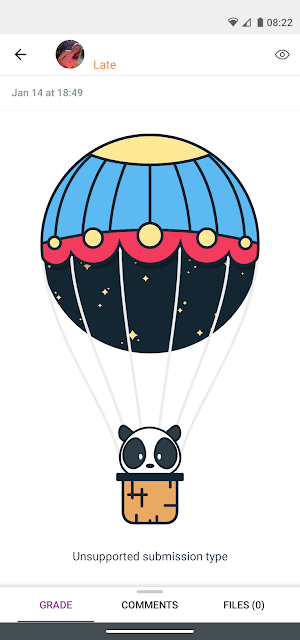
When using Google LTI 1.3 assignments in Canvas, the Canvas Teacher app on Android reports that the submission type is unsupported.  There is only the ability to message the student. The solution is to log in using a browser. At this institution does have to first go into Settings > Google and add the G Suite of Education Google account on an Android device. This is important. Because when one first goes to the college Canvas URL, an error message is initially shown. Then a few moments later one is given an option of which account to use to log into Canvas: this only appears if the second account has already been added via Settings. This is an important step in the Android world. Provided one has the necessary account authorized in Settings, then the rest proceeds relatively smoothly. Although I have Canvas Teacher installed on the device, the web site helpfully suggests that I install Canvas Student. I had actually just uninstalled Canvas Student because I was getting double no...

ChromeCast First Light A101

Image
With the assistance of the division of information technology, a ChromeCast unit was brought up and online in A101 permitting the casting of a mobile phone screen to a fifty inch monitor in the room. As a test of bandwidth and connectivity at the far east end of the campus, a streaming service was used to cast the first image. This image is from the the original series pilot for Star Trek. The core use of the technology will be to display Desmos graphing calculator, Google Slides, and science documentaries from a mobile phone  After testing the unit in A101, an impromptu informal demonstration of the technology was done for the director of the Media and Information Technology Center, a unit that delivers content for classes on site with video home system tapes (VHS) and digital video discs (DVD).  In MITC I demonstrated a streaming video service and Google Slides. 

Instructure Canvas exploration from student on mobile point of view

Image
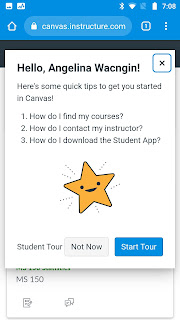
A previous rambling look at Instructure Canvas explored Canvas on a laptop from the instructor and student point of view as seen by a veteran user of Schoology. Of concern has been that a significant number of the students at the college connect only via mobile devices, and the Canvas student app, although free, can only log into a Canvas registered school. This would leave students using their browser on their mobile device to access Canvas. This author's experience with attempting to user Schoology in a mobile device browser has been that Schoology is not mobile ready. In the following screens the student is using a three year old Motorola Moto G5 Play, an older budget grade mobile device, a device that might still be more capable than some of the mobile devices in use here.  After logging in and  After logging in Angelina is offered a tour of Canvas a new user. Setting aside the tour, Angelina is asked to review notification settings. The defaults are left in place. The no...